SOLIDWORKS has developed something of a reputation for offering products with confusing naming conventions, and this has been no exception. Over the last year, you’ve likely been tripped up by one of the many product names used in help articles, search results, or advertisements:
- SOLIDWORKS
- 3DEXPERIENCE SOLIDWORKS
- SOLIDWORKS with Cloud Services
- SOLIDWORKS Connected
- SOLIDWORKS Augmented
- SOLIDWORKS Desktop
If you have no idea what any of these product names mean, you’re certainly not alone. To add to the confusion, some of these product names were kept mostly internal and have since been scrubbed from the internet over the last few months, making “SOLIDWORKS Augmented” feel like a fever dream that I just woke up from.

“SOLIDWORKS Augmented” was a marketing term used for a brief period of time by the SOLIDWORKS reseller network – Now it instead refers to augmented reality
Dassault Systèmes and its reseller network have gone through a few rounds of branding adjustments over the last few years in an attempt to distinguish and communicate the differences between the various versions of SOLIDWORKS – and in years past, it made sense to separate these versions as there were a handful of important capability differences.
These days however, the capability of the two versions is nearly identical, and as of late 2025 each of the product names listed above is being unified into one single brand – SOLIDWORKS Design. This is fantastic news for those of us who have spent the last several years trying to keep track of every detail of each version. Now you only have to answer two questions when purchasing SOLIDWORKS – Do you want access to cloud tools, and what kind of licensing scheme would you like?
SOLIDWORKS Design
This version of SOLIDWORKS used to be referred to as 3DEXPERIENCE SOLIDWORKS or SOLIDWORKS Connected. It’s automatically connected to cloud data management tools and most importantly, uses a named-user licensing scheme. This means that wherever you go, from any machine, you can login and install/use SOLIDWORKS without worrying about activating license keys.
On the flip side, however, a named user license belongs to one specific user and can’t be shared between multiple users. This makes named-user licensing difficult to deal with for classrooms, maker spaces, and organizations where software is frequently traded between users.
You may see this version use a “CC” suffix, which is an abbreviation for Cloud Connected, but as it appears to be SOLIDWORKS’ default offering, the product page currently lists it simply as SOLIDWORKS Design.
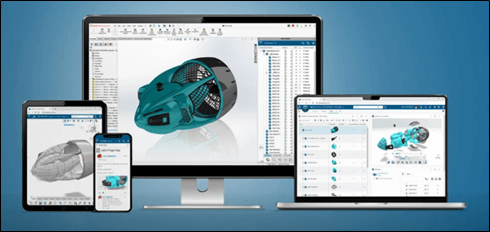
The cloud-connected version automatically includes access to browser-based 3DEXPERIENCE tools
SOLIDWORKS Design with Cloud Services
Despite its longer name, this version of SOLIDWORKS is closer to the “traditional” offering from years past where it was known as SOLIDWORKS, SOLIDWORKS Desktop, SOLIDWORKS Augmented, and probably several other names if you look hard enough. This version offers a device license, which means anyone and everyone can use it on its activated machine. You won’t have the same portability as a named-user license, but it’s preferable in situations where multiple users work on the same machine each day.
Regarding cloud tools, they are optional with this version, with the official SOLIDWORKS webpage describing it as “the ability to access included cloud capabilities when you are ready.” Essentially, this is your standard install of SOLIDWORKS with a serial number, along with the ability to connect to the 3DEXPERIENCE platform if you choose to. We even created a full-length Ask SolidProfessor video covering how to take advantage of these tools (or not!) in this version of SOLIDWORKS.
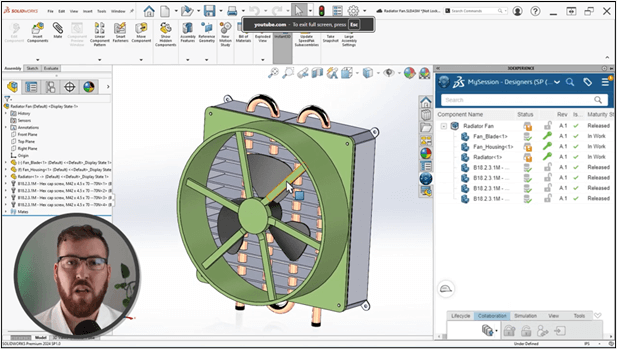
Ask SolidProfessor lesson demonstrating Cloud Service in SOLIDWORKS
You may see this version use a “CS” suffix, which is an abbreviation for Cloud Services, but it’s listed plainly as SOLIDWORKS Design with Cloud Services on the product page.
Wrap-Up
SOLIDWORKS has tried a handful of product names over the last few years with varying levels of success in an effort to find something that communicates their products clearly. After several years of trying to find the right branding, it seems they’ve settled on SOLIDWORKS Design, unifying the cloud connected and cloud services versions under a single banner. This should be welcome news to anyone trying to understand the various options available.
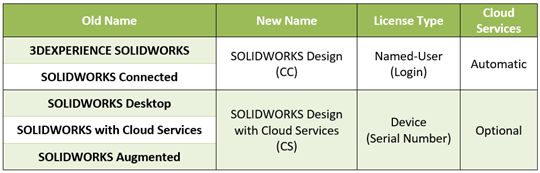
Here’s a simple table to help you understand the new product names and capabilities:
To learn more about the latest and great SOLIDWORKS has to offer, be sure to catch our What’s New in SOLIDWORKS series for 2026!