






Question
How can I get the Student Edition of SOLIDWORKS for free?
Snapshot
The student version of SOLIDWORKS has always been known for being more accessible to students compared to its commercial counterpart, but its $85 price tag and requirement for users to provide a .edu email address still made things unnecessarily complicated. As of July 2026 though, things have gotten quite a bit easier. Eligible students and instructors can now download the student edition of SOLIDWORKS at no cost, and a .edu email address is no longer required.
In our latest Ask SolidProfessor episode on Free SOLIDWORKS for Students, you’ll learn who qualifies, what’s included, how to download and install the software, and the limitations you should be aware of before you begin. If you’re trying to learn CAD, build a portfolio, or prepare for certification, this lesson explains whether the free Student Edition is the right choice for you.
The student version of SOLIDWORKS is the fully-featured desktop installation, not a browser-based program
At a Glance
- Cost: Free for eligible students and instructors
• Eligibility: Active students and educators at recognized educational institutions
• Commercial Use: Not permitted
• Platform: Windows desktop version of SOLIDWORKS
• What’s Included: Parts, Assemblies, Drawings, Sheet Metal, Weldments, Surface Modeling, Mold Tools, Mesh Modeling, and several Xpress products
• Biggest Limitation: Student-created files contain educational watermarks
Lesson Highlights
This lesson explains how to obtain the free Student Edition, complete registration, install the software, understand eligibility requirements, and recognize the educational-use restrictions. It also reviews the included desktop tools, clarifies common misconceptions about student file watermarks and compatibility with commercial licenses, and compares alternative licensing options including SOLIDWORKS Premium for Students, Makers, and Education Edition.
Answering a frequently-asked question about removing student edition watermarks in SOLIDWORKS
Key Takeaways
- Eligible students and instructors can download SOLIDWORKS for free.
• The Student Edition is the full Windows desktop application.
• Educational licenses cannot be used for commercial work.
• Student-created files include educational watermarks.
• The included toolset is ideal for learning CAD fundamentals and preparing for certification.
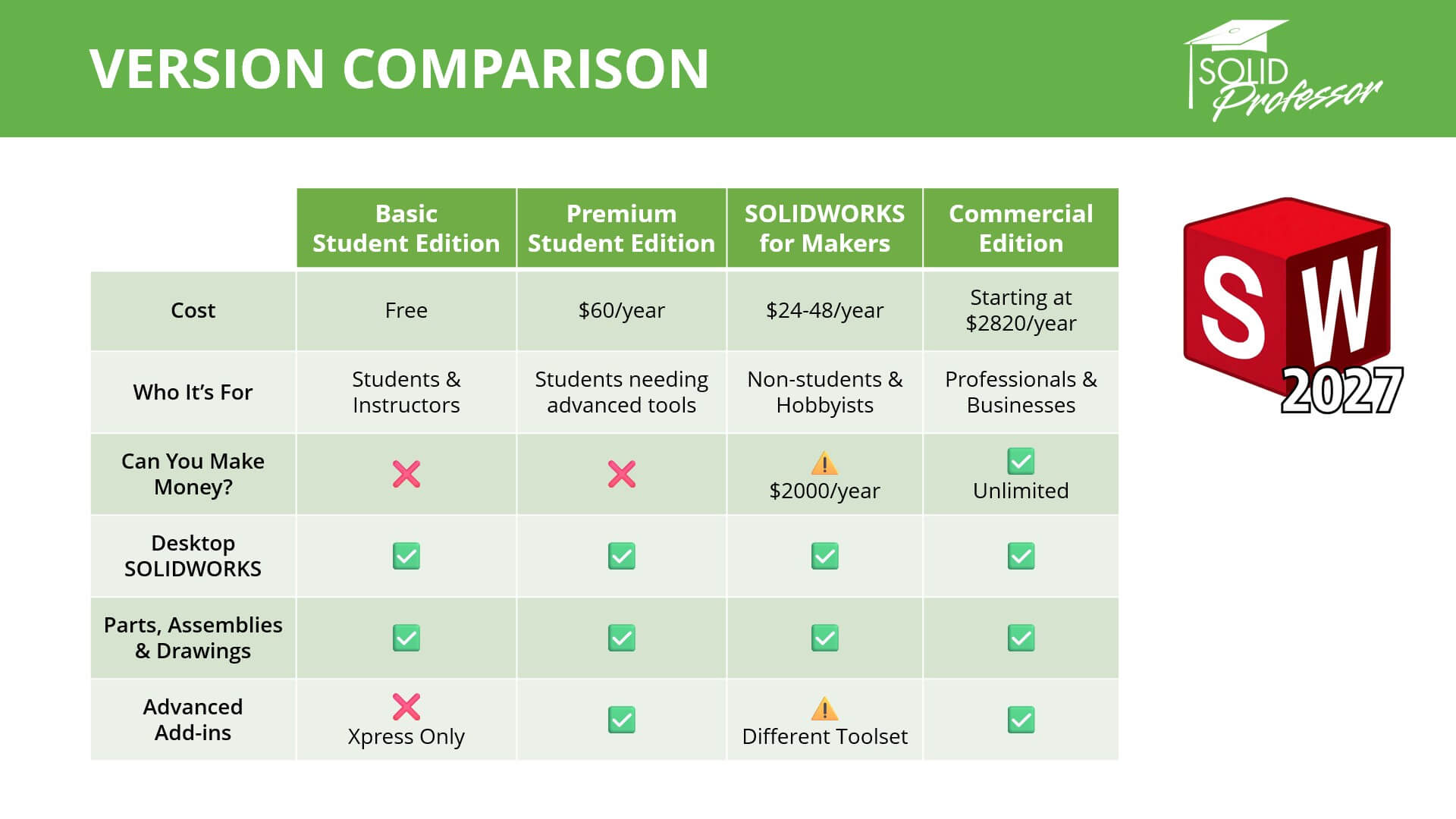
A comparison of the various available versions of SOLIDWORKS for students, hobbyists, and professionals
Learn More
Whether you’re learning CAD for the first time, preparing CAD curriculum as an instructor, or building projects for student competitions, the free Student Edition makes professional SOLIDWORKS more accessible than ever. Be sure to check out with SolidProfessor’s SOLIDWORKS Beginner to Certification course to build practical skills and prepare for certification exams.