
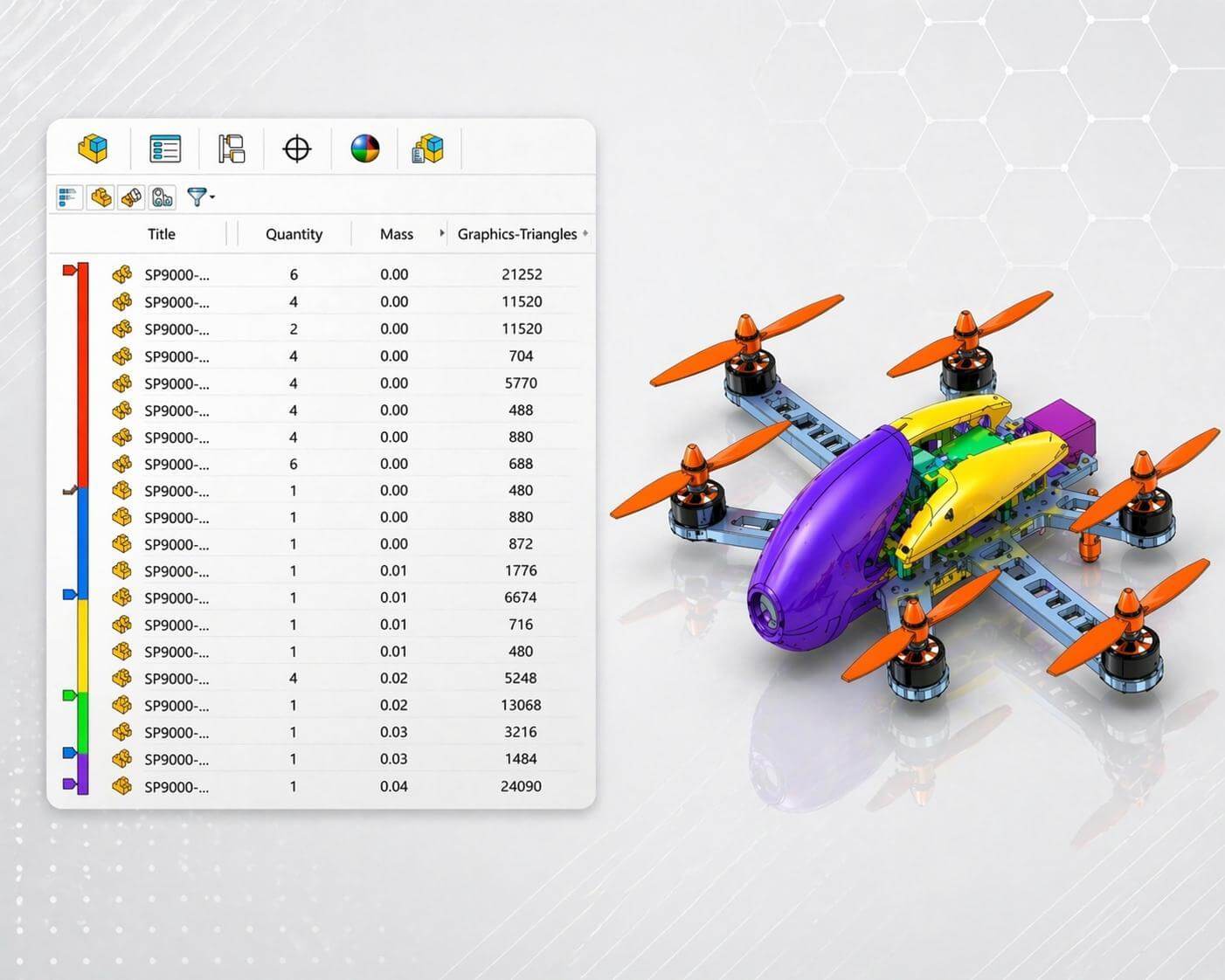
When working with large assemblies, it’s not always clear which components are driving weight or slowing performance. In our latest 2-Minute Tech Tip, see how Assembly Visualization can help you sort, rank, and color code components to make faster, more informed design decisions.
Sorting and ranking assembly components by mass for design optimization.
Assembly Visualization provides several tools for investigating and optimizing complex designs with many components:
- Sort components by mass to quickly identify the heaviest parts in an assembly
- Apply color gradients for instant visual feedback on key metrics
- Group identical components to better understand repeated contributions
- Analyze additional properties like open time, graphical complexity, or vendor data
- Open components directly from the interface to begin optimization
This tool is especially useful when working with complex assemblies, where manual evaluation would take significant time. Whether you’re reducing weight, improving performance, or reviewing design data, it helps highlight what matters most.
Sorting assembly components by additional criteria including graphics triangles, open time, and vendor.
Assembly Visualization makes it easier to evaluate and optimize designs according to your specific design criteria without leaving the assembly environment. For information on additional assembly tools and techniques, consider taking a look at SolidProfessor’s SOLIDWORKS Essentials for Assembly Design course or SOLIDWORKS Advanced Assembly Design for more advanced concepts.